
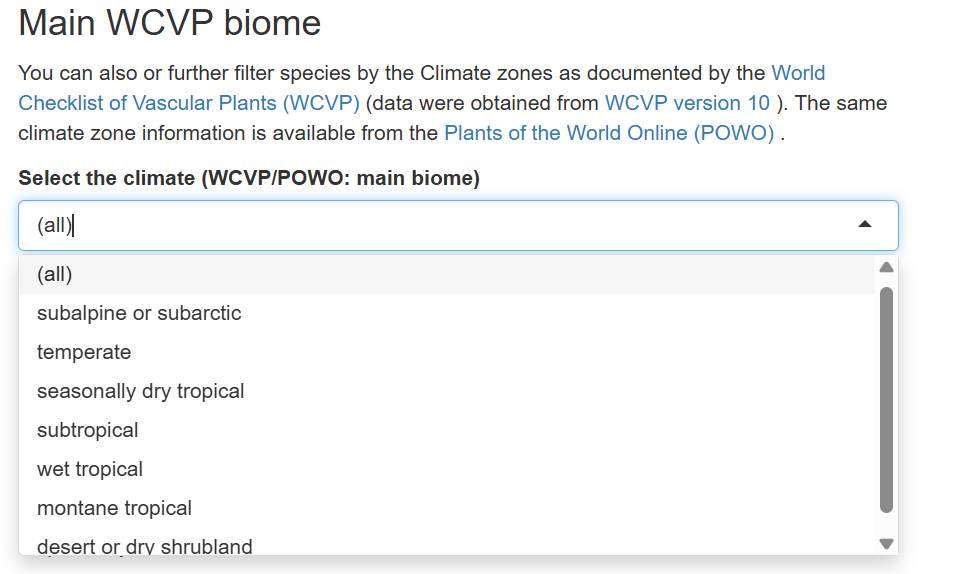
To refine her species selection, she can further filter by Main WCVP Biome climate zones as documented by the World Checklist of Vascular Plants (WCVP). This data is derived from WCVP version 10 and offers valuable insights into the climatic suitability of different plant species. Additionally, the same climate zone information can be cross-referenced on Plants of the World Online (POWO).
But before diving into the filtering process, let’s first understand what a biome is.
A biome refers to a large, naturally occurring ecosystem defined by specific climate conditions, vegetation types, and animal species. Examples of biomes include tropical rainforests, savannas, deserts, and temperate forests. Each biome is shaped by environmental factors such as temperature, rainfall, and soil type, which influence the plant species that can thrive there.
Step by step on filtering by Main WCVP Biomes
Aisha wants to identify species suited to the dry, semi-arid conditions of her planting site. She follows these steps:
1. Identify the relevant biome
- Aisha consults Plants of the World Online (POWO) to confirm her region's biome classification using WCVP climate zone data.
2. Select the appropriate biome filter
- After verifying that her site falls within a dry shrubland biome, she navigates to the GlobUNT WCVP Biome Filter under the "Filter Climates" tab.
- She selects "Dry Shrubland" from the dropdown menu.
3. Generate the species list
- Aisha clicks “Show Species tab”, and the tool updates the list to display species specifically suited to dry shrubland conditions.
- This helps her choose species that align with the ecological requirements of her planting site.